By the Time Card Calculator Pro editorial team · Last updated · Overtime maths checked against worked examples
This free time card calculator adds up the hours on a weekly or biweekly time card, takes out unpaid lunch breaks, splits regular hours from overtime and works out gross pay. It is built for small business owners, office managers and bookkeepers who total paper or punch-clock cards before payroll, and for hourly employees who want to check their paycheck.
How to use this time card calculator
- Pick the week. Choose Weekly or Biweekly and set the first day of the pay period. Add the employee's name and hourly rate if you want gross pay.
- Enter the punches. Type the time in and time out for each day, for example 8:00 am and 4:30 pm. Use the Lunch out and Lunch in columns for an unpaid lunch, or turn lunch punches off and type break minutes instead.
- Choose the overtime rule. Pick weekly overtime over 40 hours (federal), daily over 8 hours plus weekly, California rules, or no overtime. Add rounding under More options if your company rounds punches.
- Read the totals. Total hours appear as hours:minutes and decimal hours, split into regular, overtime and double time, with gross pay if you entered a rate.
- Download or print. Download a PDF timesheet with signature lines, or print it for your records and payroll.
How a time card clock calculator works out your hours
A time card clock calculator does the same sum you would do by hand, just without the mistakes that creep in when minutes cross the hour. For each day it takes time out minus time in, then subtracts the unpaid lunch (lunch in minus lunch out) and any other unpaid break. The daily results are added up for the week, converted to decimal hours, and checked against the overtime rule you picked.
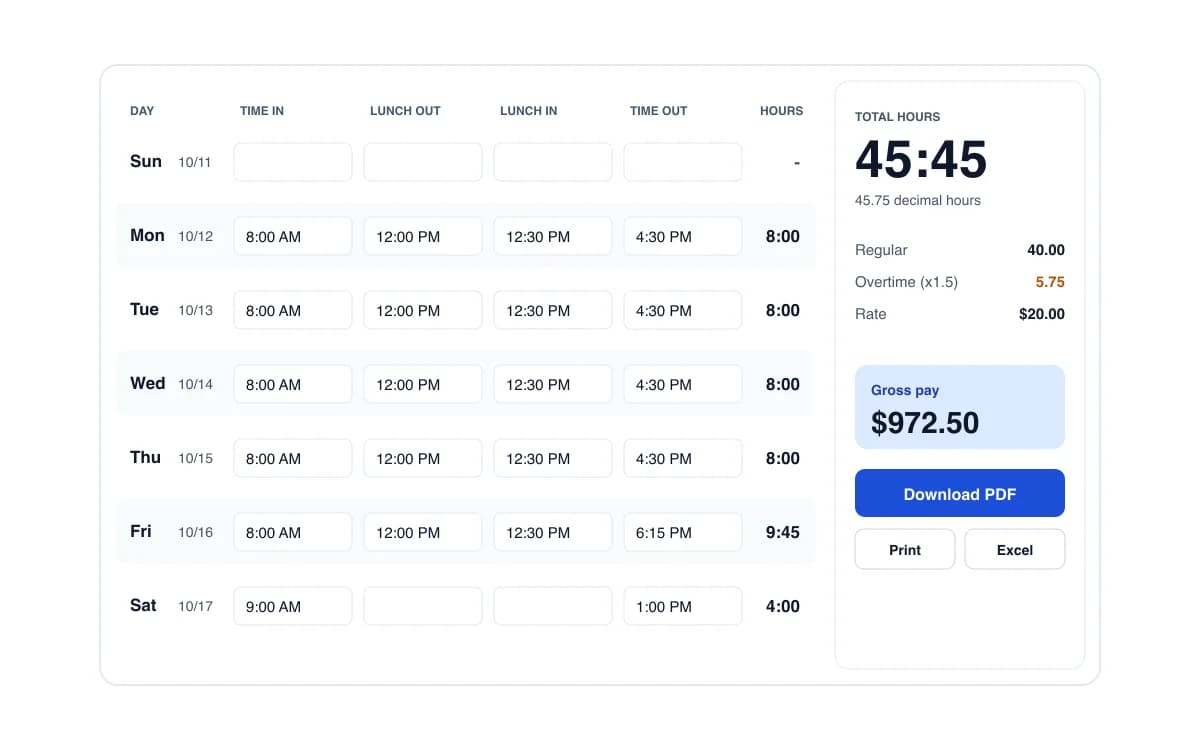
Here is a worked example for one week at $20 an hour with a 30 minute unpaid lunch:
| Day | In | Lunch | Out | Hours |
|---|---|---|---|---|
| Mon to Thu | 8:00 am | 12:00 to 12:30 | 4:30 pm | 8:00 each (32:00) |
| Fri | 8:00 am | 12:00 to 12:30 | 6:15 pm | 9:45 |
| Sat | 9:00 am | none | 1:00 pm | 4:00 |
| Total | 40.00 regular + 5.75 overtime | 45:45 (45.75 h) | ||
Gross pay is 40 x $20 = $800 regular plus 5.75 x $30 = $172.50 overtime, so $972.50. Press Fill example in the calculator to load this week and check it yourself.
Converting time card minutes to decimal hours
Payroll is paid on decimal hours, not hours and minutes. To convert, divide the minutes by 60: 15 minutes = 0.25, 30 minutes = 0.50, 45 minutes = 0.75, 10 minutes = 0.17. A common mistake is writing 7 hours 30 minutes as 7.30 instead of 7.50, which underpays by 12 minutes. The calculator shows both formats, and our minutes to decimal hours chart lists every minute from 1 to 60 for quick lookups.
Overtime rules the calculator supports
- Weekly over 40 hours (federal FLSA). Hours over 40 in a fixed 7-day workweek are paid at 1.5x. Each workweek stands on its own, so on a biweekly card 45 hours one week and 35 the next is still 5 hours of overtime, not an 80-hour average.
- Daily over 8 hours, then weekly. For employers or states that pay overtime per day. Hours over the daily limit are overtime first, then any regular hours over 40 for the week are added.
- California. 1.5x after 8 hours in a day, 2x after 12 hours, 1.5x for the first 8 hours on the seventh consecutive day of the workweek and 2x after that, plus weekly overtime over 40 (California Labor Code section 510).
- No overtime. For exempt staff, contractors or when you only need total hours.
You can change the weekly threshold and the multiplier under More options, for example if your union contract pays overtime after 37.5 hours.
Lunch breaks and rest breaks
Federal rules treat a real meal period of 30 minutes or more, where the employee is fully relieved from duty, as unpaid time. Short rest breaks of 5 to 20 minutes count as hours worked and must be paid. Use the lunch punch columns for the unpaid meal. If you also record short coffee breaks, tick Extra breaks are paid so they are not deducted. Several states require meal or rest breaks after a set number of hours, so check your state's rules.
Rounding time card punches (the 7-minute rule)
Many time clocks round punches to the nearest 5 minutes, tenth of an hour (6 minutes) or quarter hour (15 minutes). With quarter-hour rounding, 8:07 rounds to 8:00 and 8:08 rounds to 8:15, which is why it is called the 7-minute rule. Rounding is allowed under federal rules only if it is neutral over time. Pick the same rounding your time clock uses so your totals match the payroll report.
Time card calculator vs time tracking software
If your team already writes hours on paper or punches a clock, a calculator is all you need. Full time tracking apps make sense when people clock in on their phones. Prices checked October 2026:
| Tool | Price | What it is | Best for |
|---|---|---|---|
| This calculator | Free (Pro $49/yr) | Weekly or biweekly hours, OT, PDF; no signup | Totaling paper or punch-clock cards |
| Clockify | Free up to 5 users, paid from $3.99 per user/mo | Live time tracking app | Teams that clock in on an app |
| Toggl Track | Free tier, paid from $9 per user/mo | Time tracking and reports | Agencies and freelancers |
| Redcort Virtual TimeClock | $195 to $495+ one time | Desktop time clock software | Shops wanting an on-site clock |
More free tools
- Clock-out time calculator: what time to leave to finish 8 hours, or to reach 40 for the week.
- Biweekly time card calculator: two workweeks on one card with overtime per week.
- Free timesheet templates: weekly and biweekly Excel templates with formulas, plus printable PDFs.
Results are estimates to help with record keeping. They are not legal or payroll advice. Employers are responsible for following federal, state and local wage and hour laws.
Frequently asked questions
How do I calculate hours worked on a time card?
Subtract the time in from the time out, then subtract any unpaid lunch. Example: 8:00 am to 4:30 pm is 8 hours 30 minutes; minus a 30 minute lunch is 8:00 hours. Add each day together for the weekly total. The calculator above does this for every day and handles shifts that cross midnight.
How do I convert minutes to decimal hours for payroll?
Divide the minutes by 60. 15 minutes is 0.25 hours, 30 minutes is 0.50, 45 minutes is 0.75, and 20 minutes is 0.33. So 38 hours 45 minutes is 38.75 decimal hours. Payroll systems multiply decimal hours by the hourly rate. See our full minutes to decimal hours chart.
When does overtime start?
Under the federal Fair Labor Standards Act, non-exempt employees earn at least 1.5 times their regular rate for hours over 40 in a workweek. Some states add daily overtime: California pays 1.5x after 8 hours in a day and 2x after 12. Check your state's labor department for the rule that applies to you.
Is lunch break paid or unpaid?
Under federal rules, a bona fide meal period (normally 30 minutes or more, fully relieved from duty) does not have to be paid. Short rest breaks of about 5 to 20 minutes are counted as hours worked. That is why the calculator always deducts lunch punches but lets you mark extra breaks as paid.
Can the time card calculator handle overnight shifts?
Yes. If the time out is earlier than the time in (for example 10:00 pm to 6:30 am), the calculator assumes the shift ended the next day and counts 8.5 hours, minus any unpaid break.
What is the 7-minute rule for time cards?
It is the common name for rounding to the nearest quarter hour. Punches 1 to 7 minutes past a quarter hour round down, and 8 to 14 minutes round up. Federal rules allow rounding to the nearest 5 minutes, tenth or quarter of an hour as long as it averages out and does not always favor the employer. Turn it on under More options.
Do I need to type AM and PM?
No. You can type 8, 830, 8:30, 8:30am or 17:30. If you leave off AM and PM, a time out that looks earlier than the time in is read as the afternoon (8 to 5 is 9 hours), and a shift like 22:00 to 6:00 is read as overnight.
Is this time card calculator free?
Yes. The weekly and biweekly calculator, overtime rules, rounding and PDF timesheet are free with no signup. Time Card Pro ($49 a year) adds saved employees, semi-monthly and monthly pay periods, Excel and CSV exports for payroll and branded timesheets.