By the Time Card Calculator Pro editorial team · Last updated · Overtime maths checked against worked examples
A timesheet template is a ready-made form for recording the hours an employee works each day so you can calculate pay. These templates are built for small businesses, nannies and household employers, contractors and anyone who still tracks time on paper or in a spreadsheet instead of a time clock app.
Weekly timesheet template
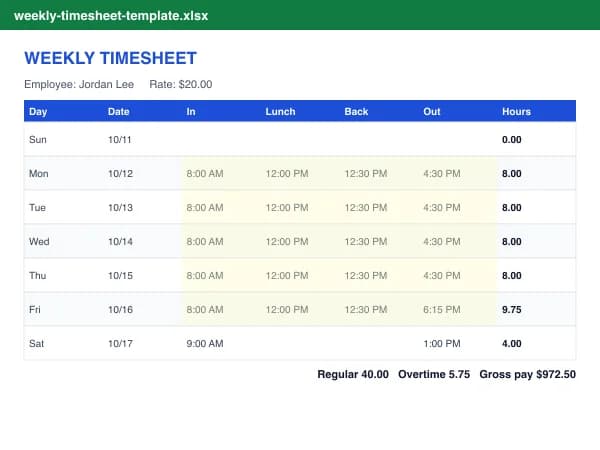
The weekly timesheet template is the most common format in the US because overtime is based on a 7-day workweek. Each row is a day with Time in, Lunch out, Lunch in, Time out and an optional break in minutes. The Hours column uses the formula (Time out minus Time in) minus (Lunch in minus Lunch out) minus break, which also works for overnight shifts. At the bottom, hours up to 40 are regular and anything above is overtime at 1.5x.
Biweekly timesheet template
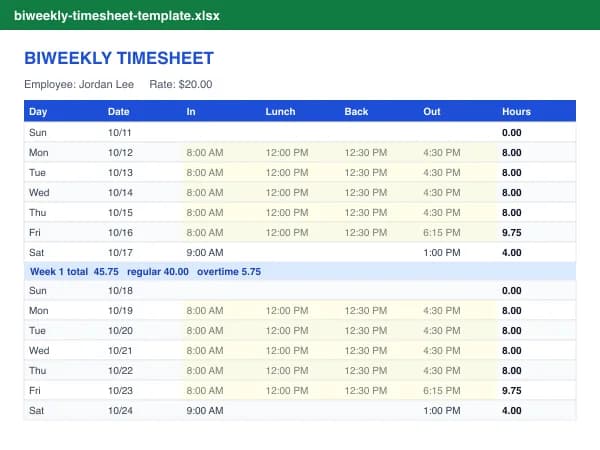
If you run payroll every two weeks, use the biweekly template. It shows two separate workweeks with a subtotal for each, because overtime must be counted week by week. A worker with 44 hours in week 1 and 36 in week 2 is owed 4 hours of overtime even though the total is 80.
How to fill out a timesheet
- Download the template. Download the Excel file and open it in Excel, Excel for the web, Google Sheets (File, Import) or Numbers. Or print the PDF for handwritten time cards.
- Fill in the header. Type the company, employee, the first day of the pay period and the hourly rate in the yellow cells. Dates for each day fill in automatically.
- Enter daily punches. Type times like 8:00 AM in Time in, Lunch out, Lunch in and Time out. Add any other unpaid break in minutes.
- Check the totals. Daily hours, regular hours, overtime and gross pay calculate by themselves. Change the overtime threshold or multiplier if your policy differs.
- Sign and keep a copy. Print or save as PDF, have the employee and supervisor sign, and keep it with your payroll records.
What to include on an employee timesheet
- Company name and employee name or ID
- Pay period start and end dates
- Time in and time out each day, plus unpaid meal breaks
- Total hours per day and per workweek, split into regular and overtime
- Hourly rate and gross pay (optional on the employee's copy)
- Employee signature and supervisor approval with dates
Common timesheet mistakes
- Writing minutes as decimals. 7 hours 30 minutes is 7.50 hours, not 7.30. Use our minutes to decimal hours chart.
- Averaging overtime over two weeks. Overtime is per workweek.
- Deducting short breaks. Under federal rules, rest breaks of 5 to 20 minutes are paid time.
- Missing punches. A missing lunch-in or time-out makes the whole day wrong. Fill every column or leave the day blank.
Templates are provided as general record-keeping forms and are not legal or payroll advice. Check federal and state wage and hour rules for your business.
Frequently asked questions
Are these timesheet templates free?
Yes. Every template is free to download, edit and use in your business. There is no email gate and no signup.
Do the Excel timesheets calculate overtime?
Yes. The weekly and biweekly templates total each day, then split each workweek into regular hours (up to 40 by default) and overtime, and multiply by your rate and overtime multiplier for gross pay.
Can I use the timesheet template in Google Sheets?
Yes. In Google Sheets choose File, Import, Upload and select the .xlsx file. The formulas and time formats carry over. Type times as 8:00 AM so Sheets recognizes them.
What should a weekly timesheet include?
The employee's name, the pay period dates, daily time in and time out, unpaid meal breaks, total hours per day and week, overtime hours, and signatures from the employee and a supervisor. Federal rules also require employers to keep the hours worked each workday and workweek.
What is the difference between a timesheet and a time card?
They record the same thing. A time card is traditionally a card punched by a time clock, while a timesheet is a form or spreadsheet where hours are written or typed. Both are used to calculate pay.
How long should I keep timesheets?
Under the FLSA, employers keep time cards and work time schedules for at least 2 years and payroll records for at least 3 years. Some states require longer, so check your state's rules.
Is there an easier way than a spreadsheet?
If you just need totals, the free time card calculator works out hours, overtime and pay as you type and gives you a PDF. Time Card Pro adds saved employees and Excel or CSV exports for every pay period.